
A rough log kept every day for a month teaches more about your actual eating patterns than a perfectly precise log abandoned after five days. Consistency is the skill being built early on.
Why it's different
Why beginners need a different approach than experienced trackers
Someone who's tracked calories for years has built shortcuts, memorized common foods and developed portion instincts. A beginner has none of that yet, and most apps assume a baseline of nutrition knowledge that simply hasn't formed.
500 kcal/day deficit is a common, sustainable starting point for weight loss — roughly 1 lb per week
80% accuracy is a realistic and useful target for a beginner's log — perfection isn't required to see results
21 days is a common rough estimate for a new daily habit like logging meals to start feeling automatic
Most beginners underestimate portions, especially of calorie-dense foods like oils, nuts, cheese and dressings — not out of dishonesty, but because eyeballing accurately takes practice most people haven't done yet.
Typing 'grilled chicken breast, 6 oz, no skin' into a search bar for every ingredient of every meal is enough friction to make most people stop logging within two weeks — the app has to be faster than the food is memorable.
Seeing the numbers day after day — what a meal actually costs, what a workout actually burns — is what makes the concept intuitive, more than any explanation up front.
What it looks like
A sample first week for a beginner
A moderate calorie target with logging kept simple — the goal in week one is building the habit of logging every day, not hitting the number exactly.
Example day
Daily targets
calories ~1,800 a starting estimate; adjust after a week or two of real data
protein 90 g+ a simple floor to aim for without tracking every other macro closely yet
logging goal every meal even an imperfect entry beats a skipped one
consistency goal 7/7 days the habit is the actual target in week one
A logged day
7:30 AM Oatmeal with banana and peanut butterlogged by photo — no manual searching needed ~420 kcal
12:30 PM Turkey sandwich + chipsa normal lunch, logged as eaten, not a 'diet' version ~550 kcal
3:30 PM Protein bara quick snack still gets logged, not skipped because it's small ~200 kcal
7:00 PM Pasta with chicken and vegetablesa realistic dinner, logged even though the portion is a guess ~650 kcal
How Burnplate handles it
How Burnplate makes tracking approachable for beginners
Burnplate is built so the first week of logging doesn't require nutrition knowledge or patience for manual data entry — the goal is removing the friction that makes most beginners quit.
Photo logging instead of manual search
Snap a photo of a meal, confirm what Burnplate found, adjust the portion if needed, and it's logged — no typing every ingredient into a search bar one at a time.
Targets set automatically from your goal
Answer a few questions about your body, activity and goal, and Burnplate sets a calorie and protein target for you — no need to calculate anything yourself before starting.
A simple daily balance, not a wall of numbers
See one clear number — calories left to eat today — rather than a dashboard of macros, percentages and charts that can feel overwhelming before the basics are familiar.
The burn bar connects logging to activity right away
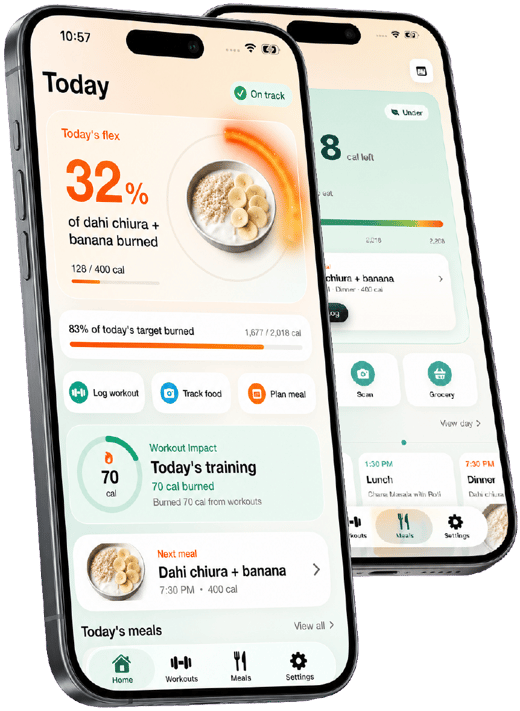
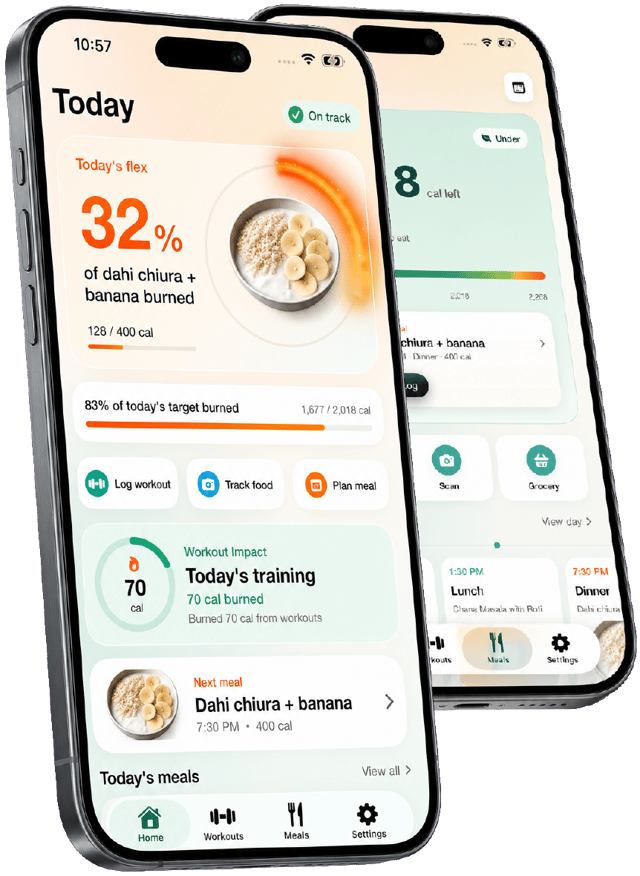
Log a walk or workout and see the visible percentage of a meal it burned off — an early, tangible way to feel the calories in vs. out relationship instead of just reading about it.
Practical guidance
Tips for calorie counting as a beginner
The habits that actually determine whether tracking sticks past the first two weeks.
- 01 Log everything, even when it's not perfect
A rough estimate logged is far more useful than a precise number skipped because logging felt like too much effort in the moment.
- 02 Don't change your diet in week one
Track what you normally eat first to understand your real starting point, before trying to change anything based on the numbers.
- 03 Use photo logging for anything mixed or homemade
It's faster than searching a database and good enough to catch real patterns, especially early on.
- 04 Expect the first week's number to be rough
Portion estimation improves with practice — don't judge the first week's total too harshly.
- 05 Pick one number to focus on first
Calories alone is enough to start; add protein tracking once logging itself feels automatic, usually after a week or two.
- 06 Log the bad days too
A day with dessert or a bigger portion than planned is still worth logging — those days are part of the real pattern, not a reason to skip logging.

Track it with a photo, not a search bar
Start tracking free Burnplate sets your calorie and macro targets, logs meals from a photo, and shows how much of each meal your workouts and steps have burned off.
Questions
Calorie tracker for beginners: FAQ
How do I start counting calories as a beginner?
Start by logging what you already eat for a few days without trying to change anything — this gives you a real baseline. Use photo logging or search rather than manually calculating every ingredient, and don't worry about perfect precision; a rough, consistent log teaches more than a perfect, abandoned one.
How accurate do I need to be when counting calories?
Roughly accurate is enough to start — most of the value in calorie counting for beginners comes from consistency and pattern recognition, not decimal-level precision. Accuracy tends to improve naturally as portion estimation gets easier with practice.
What's the easiest way to track calories without a lot of effort?
Photo logging is the lowest-effort method available — snap a picture of the meal, confirm what the app found, and adjust the portion if it's off. It removes the manual search-and-type process that causes most beginners to give up.
How many calories should a beginner eat to lose weight?
A moderate deficit of roughly 500 calories a day below maintenance is a common, sustainable starting point, producing about 1 pound of loss per week. The exact number depends on your body size, activity level and goal — a calorie calculator sets a starting estimate to adjust from actual results.
Why do most people quit calorie counting?
Manual entry friction is the most common reason — typing every ingredient of every meal into a search bar is tedious enough that most people stop within a couple of weeks. Apps that log by photo or make re-logging repeat meals fast remove most of that friction.
Is Burnplate good for someone who has never tracked calories before?
Yes — it's designed to set your targets automatically and log meals by photo rather than requiring nutrition knowledge or manual data entry upfront, which is where most beginners get stuck.
